The logo appears perfect on your website; however, whenever you present it for a banner, shirt, or poster, the print service requires a vector graphic. Thus, you are faced with two choices: to use software or to hire an expert designer to draw the logo from scratch.
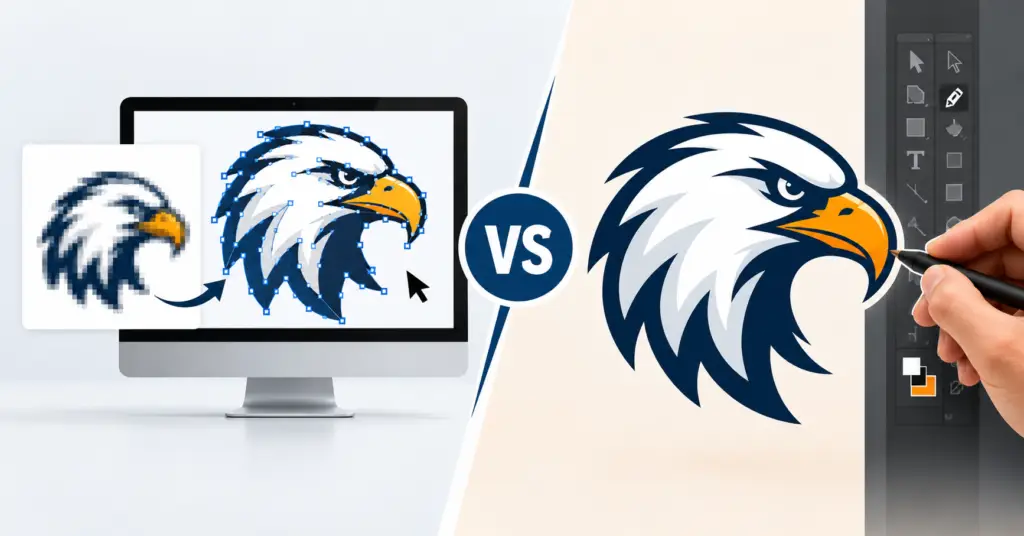
Quick Answer: In the automatic vs manual logo vectorisation debate, the automatic tools make the process very quick and cost-efficient but result in rough edges, messy files, and wrong colours. On the other hand, manual vectorisation takes some time; however, it delivers clean, accurate, print-ready artwork. For any logo going to print, embroidery, or signage, a manual is the better choice.
Automatic vs. Manual Logo Vectorisation: Quick Comparison
| Factor | Automatic vectorisation | Manual vectorisation |
| How it works | Software traces the image in one click. | A designer redraws the logo path by path. |
| Speed | Seconds | A few hours |
| Accuracy | Rough, uneven edges | Precise, faithful to the original |
| Text | Often distorted | Rebuilt with the correct or closest font |
| Colours | Extra or wrong shades | Exact brand colours |
| File quality | Thousands of messy anchor points | Clean, light, editable paths |
| Best for | Quick previews, simple shapes | Printing, embroidery, signage, branding |
What Is Automatic Logo Vectorisation?
Automatic logo vectorisation refers to the use of programs such as Image Trace in Adobe Illustrator or other internet applications to transform a JPG or PNG logo into a vector graphic. The program recognises the image boundaries and colour areas and has the ability to trace them in a few seconds. The system functions perfectly when faced with simple logos with a high contrast. Nevertheless, it struggles dealing with blurry pictures or small characters, as it only reproduces what it sees, including all the blurs and pixel noise.
What Is Manual Logo Vectorisation?
Manual logo vectorisation means a skilled designer redraws the logo by hand in software like Adobe Illustrator or CorelDRAW. The reference image will be used to create the logo and rebuild every shape, curve, and letter with clean vector paths.
Since it is a person making the decisions regarding the vector logo, he will be able to solve the problems with unclear edges, add missing details, use the precise colours, and recreate text with the correct font. Learn more our guide on How to Convert an Image to Vector
Automatic vs. Manual Logo Vectorisation: Key Differences
Here are the main differences between automatic and manual logo vectorisation: –
- Accuracy
Automatic tools estimate the locations of edges, resulting in rounded corners and jagged curves. Humans do manual vectorisation to recreate the logo’s design accurately with well defined corners and smooth curves.
- Detail & Complexity
Automatic software is unable to detect minute characters, thin lines, and intricate details, especially in low-quality images. A graphic designer can create those details with ease, even when they are not visible in the original design.
- Path Quality
Auto-traced images often have thousands of unnecessary anchor points and damaged shapes. Manual vectorisation requires only the necessary points, making the design neat and accurate.
- Colour Reproduction
Automatic tracing processes result in colour patches and extra shades. In contrast, manual vectorisation employs flat colours with Pantone or CMYK codes that are similar to your brand colour standards.
- Editing Flexibility
Manually vectorised logos are created in layers consisting of specific shapes and text. On the contrary, auto-traced files are not easy to edit.
- Production Readiness
Print and embroidery machines require complete colours and perfect paths for both printing and embroidery purposes. Manual files are ready to use right away, but auto-traced files need to be fixed before they can be used.
Which Logo Vectorisation Method Is Better?
Manual logo vectorisation is the best option for most business applications. As logos represent your brand, they get printed on different items, such as business cards and billboards. Automatic software is good for a quick preview or a very simple logo that will not be printed professionally.
When Should You Vectorise a Logo?
- If your logo is in a JPG, PNG, or screenshot
- If there is a request from the printer, embroiderer, or signmaker for a vector file
- If your logo is blurry or pixelated when it is enlarged
- Before you decide to make any changes in your brand or website
- When you need files for T-shirts, promotional products, vehicle wraps, or engraving
- When you have lost your original design files
What File Formats Should a Vectorised Logo Include?
| Format | Best for |
| AI | Editing in Adobe Illustrator |
| EPS | Professional printing and older design software |
| SVG | Websites, apps and cutting machines |
| Sharing proofs and print-ready files |
A professional service should give you all of these formats together.
Professional Logo Vectorisation Services in the USA
Logo vectorisation services are used by promotional product companies, printers, embroidery shops, marketing teams, and sign makers throughout the USA who require reliable services for transforming logos into vector images. Here’s what a good logo vectorisation service should be able to offer:
- 100% manual redrawing of logos without using auto-tracing techniques
- Prompt service with same day turnaround
- Accurate colour reproduction
- Support for all types of file formats without any extra charges
- Free revisions until the logo is done properly
- Complete price disclosure with no hidden costs involved
Vector.Center provides dedicated logo vectorisation services in the USA for businesses of every size.
Why Choose Vector.Center for Manual Logo Vectorisation?
- 100% hand-drawn logos: Our skilled graphic designers manually draw every logo, instead of using a tracing tool.
- Quick delivery: Receive your vector files in just 2 to 24 hours; same-day service available.
- Free corrections included: Get revisions done as many times as you want.
- All formats are available: no additional payment for formats like AI, EPS, SVG, PDF, and CDR.
- No rush fees or hidden charges: Transparent pricing on every order.
- Trusted partner since 2010: We have been serving numerous printing businesses, promo product companies, startups, and entrepreneurs throughout the USA.
See real before-and-after examples in our samples gallery.
FAQs
Can I vectorise a logo automatically?
Yes, using tools like Illustrator’s Image Trace or online converters. However, the quality of the finished product is not always good enough for professional uses.
How do I convert a logo to vector?
To convert the logo to vector, the logo needs to be started over in graphic editing software such as Adobe Illustrator using its vector drawing tools. The logo has to be recreated using clean vector lines and the right colours and font, easily exportable as AI, EPS, SVG, and PDF file formats.
What is the best format for a vector logo?
There is no single best format. AI is best for editing, EPS for printing, SVG for websites, and PDF for sharing. Keep all four.
Can a low-resolution logo be vectorised?
Yes. An experienced designer can recreate a low resolution or blurred logo using manual methods to remember lost details. Automatic tools cannot do this well.
How much does logo vectorisation cost?
The cost is based on how complicated the logo is, the number of colours, and the level of detail. Simple logos have less charge than emblems with an intricate design. Vector.Center can provide you with free quotes without any catches.
What is the difference between tracing and vectorisation?
Tracing means an automated process that uses software to repeat the outline of an object. ‘Vectorisation’ is a broader term for creating a vector image from a drawing either by methods of automation or handwork.
Conclusion
The automatic vs. manual logo vectorisation comparison shows that automatic software is faster; manual vectorisation produces greater accuracy, better path quality, and better colours. A manual vectorisation allows you to get a logo that is clean, clear, and ready for printing, embroidery, and other uses. If you want a logo that represents your brand, you should go for manual logo vectorisation.
Do you need a logo vectorisation service with free revisions and fast delivery? Vector.Center offers 100% hand-drawn logo vectorisation with same day delivery, free edits and every major file format included. Send your logo today for a free quote.