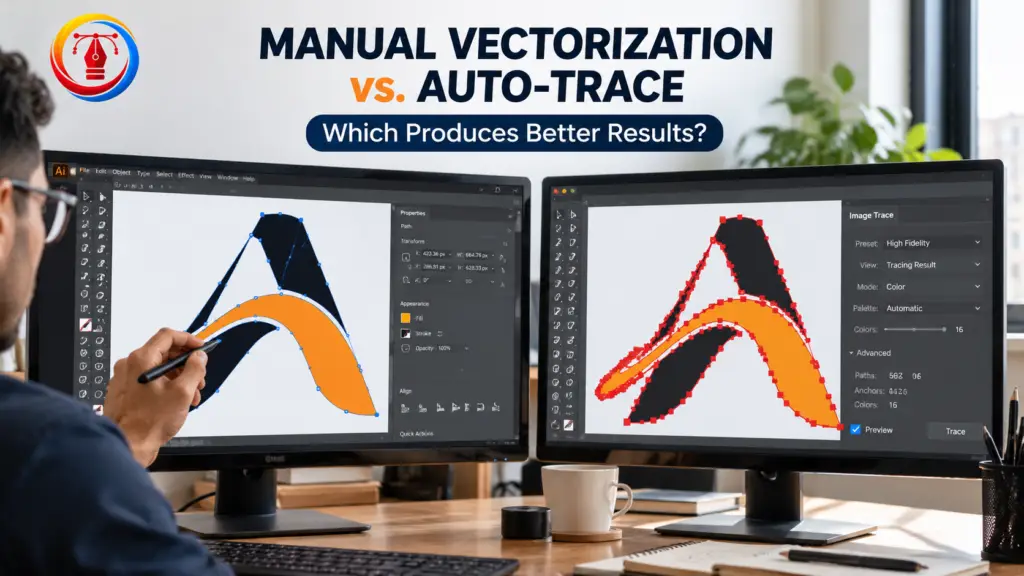
Choosing between manual vectorization and auto-trace can make a big difference in the quality of your final design. Both methods convert raster images, such as JPG and PNG files, into scalable vector graphics. However, they produce different results depending on the image, design complexity, and intended use.
For U.S. graphic designers, print shops, apparel manufacturers, embroidery businesses, and logo owners, the right method depends on accuracy, editing requirements, turnaround time, and budget. Understanding these differences helps you choose the best approach for professional image-to-vector conversion.
What Is Manual Vectorization?
Manual vectorization is the process of recreating an image using vector paths, curves, shapes, and anchor points. A designer typically uses software such as Adobe Illustrator or CorelDRAW to trace the original artwork carefully.
Instead of automatically following every pixel, the designer makes decisions about the shape, spacing, line thickness, colors, and details. This approach produces clean, editable vector artwork when performed correctly.
Manual vectorization is particularly useful for business logos, detailed illustrations, custom lettering, and designs intended for large-format printing or embroidery.
Main benefits include:
- Greater control over shapes and curves.
- Cleaner paths with fewer unnecessary anchor points.
- Better preservation of important design details.
- Easier editing and resizing.
- More reliable results for professional production.
The main drawback is that manual vector tracing usually requires more time and skilled design work than automated tracing.
What Is Auto-Trace in Vector Conversion?
Auto-trace, also called automatic image tracing, uses software to detect edges, colors, and shapes in a raster image and convert them into vector paths.
These tools can quickly turn simple images into editable vector artwork, making them useful for basic graphics, icons, and high-contrast illustrations.
However, the quality depends heavily on the source image. A clear, high-resolution image with distinct colors usually traces better than a blurry, pixelated, or complex image.
Main benefits include:
- Faster image-to-vector conversion.
- Lower initial effort for simple designs.
- Useful for processing multiple basic graphics.
- A convenient starting point for further editing.
Auto-trace can also create too many anchor points, uneven curves, unwanted shapes, or rough edges. The resulting file may require cleanup before it is ready for professional use.
Manual Vectorization vs. Auto-Trace: Key Differences
The biggest difference between manual vectorization vs. auto-trace is the level of control over the final artwork.
| Feature | Manual Vectorization | Auto-Trace |
|---|---|---|
| Speed | Usually slower | Usually faster |
| Accuracy | High when done by a skilled designer | Depends on the source image and settings |
| Curve quality | Carefully controlled | May contain uneven curves |
| Editing | Typically cleaner and easier | May require path cleanup |
| Complex logos | Often the better choice | Can struggle with fine details |
| Simple graphics | Effective but may take longer | Often efficient |
| Production readiness | Better control over technical requirements | May need additional preparation |
| Cost | Often higher | Often lower for simple work |
Neither method guarantees perfect results. A skilled designer can produce better manual vectorization, while well-configured auto-trace can work very well for simple artwork.
Which Method Produces Better Quality Vector Files?
Manual vectorization generally produces better results when accuracy, clean paths, and professional finishing matter. A designer can simplify curves, preserve important details, and remove unwanted elements instead of reproducing every irregularity in the original image.
For example, a small or blurry business logo may contain uneven edges and unclear lettering. Automatic tracing can reproduce these imperfections as extra vector points. Manual recreation allows the designer to rebuild the shapes and lettering more cleanly.
Auto-trace, on the other hand, can be an excellent choice for simple black-and-white graphics, bold icons, and high-contrast illustrations.
Remember that vector files are resolution-independent, but that does not automatically make their contents accurate. A poorly traced vector can still look rough when enlarged. The quality of the conversion determines how professional the result appears.
For projects involving pixelated images, scans, or complex graphics, raster to vector conversion can help recreate the artwork as clean, scalable vector paths.
When Should You Choose Manual Vectorization?
Choose manual vectorization when your artwork needs precision, consistent shapes, or professional production quality.
It is particularly suitable for:
- Business logos: Preserve brand shapes, proportions, and lettering.
- Screen printing: Prepare clean artwork for printed products and merchandise.
- Embroidery: Simplify artwork and prepare suitable shapes for digitizing.
- Apparel manufacturing: Create clean graphics for T-shirts, uniforms, and promotional clothing.
- Large-format printing: Maintain smooth edges on banners, signs, and displays.
- Complex illustrations: Rebuild detailed artwork where automatic tracing produces messy paths.
If you need a blurry or outdated company logo recreated, professional logo vectorization services can help produce editable artwork suitable for branding and print applications.
When Is Auto-Trace the Better Option?
Auto-trace is useful when speed is more important than precise control and the original artwork is relatively simple.
Consider it for basic icons, high-contrast illustrations, rough concept artwork, or graphics that will only need minor editing. It can also help designers create an initial vector version before refining the paths manually.
For example, a simple black icon on a white background may convert successfully with minimal cleanup. A detailed company logo with thin lines, small text, and overlapping shapes is more likely to need manual correction.
Before using an automatically traced file for printing or manufacturing, inspect its edges, colors, anchor points, and overall appearance at different sizes.
Can You Combine Auto-Trace and Manual Vectorization?
Yes. Combining both methods can provide a practical balance between speed and quality.
A designer can begin with automatic image tracing to generate the basic shapes, then manually correct uneven curves, remove unnecessary anchor points, adjust colors, and refine important details.
This hybrid workflow is especially helpful when the artwork has a relatively simple structure but still requires professional finishing.
However, heavily damaged images, complex logos, and custom lettering may be faster to rebuild manually than to repair an inaccurate automatic trace.
The goal is not to use one method for every project. It is to choose the workflow that delivers the cleanest, most useful vector file for the intended application.
Which Vector File Formats Should You Choose?
The best format depends on how you plan to use your artwork.
- SVG: Ideal for websites, digital graphics, and many scalable design applications.
- AI: Useful for editable Adobe Illustrator artwork.
- EPS: Commonly used for professional printing and exchanging vector artwork.
- PDF: Convenient for sharing and printing when the document preserves vector content.
- CDR: Useful for workflows based on CorelDRAW.
- DXF: Often used for compatible CAD, cutting, and fabrication workflows.
For embroidery, a vector file alone may not be sufficient. Embroidery machines generally require a machine-ready stitch file, such as DST or PES. The vector artwork usually needs to be digitized according to the fabric, stitch type, and production requirements.
Always confirm the required file format with your printer, manufacturer, or design team before ordering vector conversion.
How to Choose a Professional Vectorization Service
If you need a production-ready file, professional vectorization services may be worth considering. A reliable provider should understand both the artwork and its intended application.
Before choosing a service, check these factors:
- Review sample work: Look for smooth curves, accurate shapes, and clean lettering.
- Confirm file formats: Make sure the provider can deliver the format your workflow requires.
- Explain the end use: Tell them whether the design is for printing, embroidery, signage, apparel, or digital use.
- Ask about revisions: Confirm whether corrections are included if the artwork does not match the original.
- Check turnaround and pricing: Compare the complete service, not just the starting price.
- Clarify deliverables: Ask whether you will receive editable vector files and whether raster previews are included.
If you have a low-resolution logo, an old scanned design, or complex artwork, explain those limitations before ordering. This helps the provider recommend manual vectorization, automatic tracing with cleanup, or a hybrid approach.
You can explore Vector Center’s vector conversion services to learn about manual tracing, supported file formats, and options for preparing artwork for professional use.
Frequently Asked Questions
1. What is the difference between manual vectorization and auto-trace?
Manual vectorization involves recreating artwork using carefully controlled vector paths. Auto-trace uses software to detect shapes and convert them automatically. Manual work offers greater control, while auto-trace is generally faster.
2. Is manual vectorization better than automatic tracing?
Manual vectorization is generally better for detailed logos, complex illustrations, and professional production artwork. Automatic tracing can be effective for simple, high-contrast images.
3. Does auto-trace reduce image quality?
Auto-trace does not necessarily reduce quality, but it can create inaccurate shapes, rough edges, or unnecessary anchor points. The result depends on the source image, software settings, and any cleanup performed afterward.
4. Can auto-trace create editable SVG files?
Yes. Many tracing tools can export SVG files containing editable vector paths. However, the paths may need refinement before the file is suitable for professional design or production.
5. Which method is best for logo vectorization?
Manual vectorization is often the better choice for business logos because it allows careful control over proportions, curves, spacing, and lettering. Auto-trace may work for simple logos with clear edges and minimal detail.
Conclusion
When comparing manual vectorization vs. auto-trace, the best method depends on your artwork and its intended use. Auto-trace is a convenient option for simple graphics and quick conversions, while manual vectorization generally offers better control over accuracy, curves, and production-ready details.
For business logos, apparel designs, embroidery artwork, and professional printing, manual vectorization or a hybrid workflow is often the safer choice. Evaluate the final vector paths, confirm the required file format, and choose a conversion method that meets your quality standards and budget.
If you need help turning a JPG, PNG, or scanned image into a scalable design, explore Vector Center’s image-to-vector conversion services for more information about professional vector artwork.